


The Email Logs report provides a record of emails sent through the system. It helps users track email communication details, including sender, recipient, subject, attachments, and sent date and time.
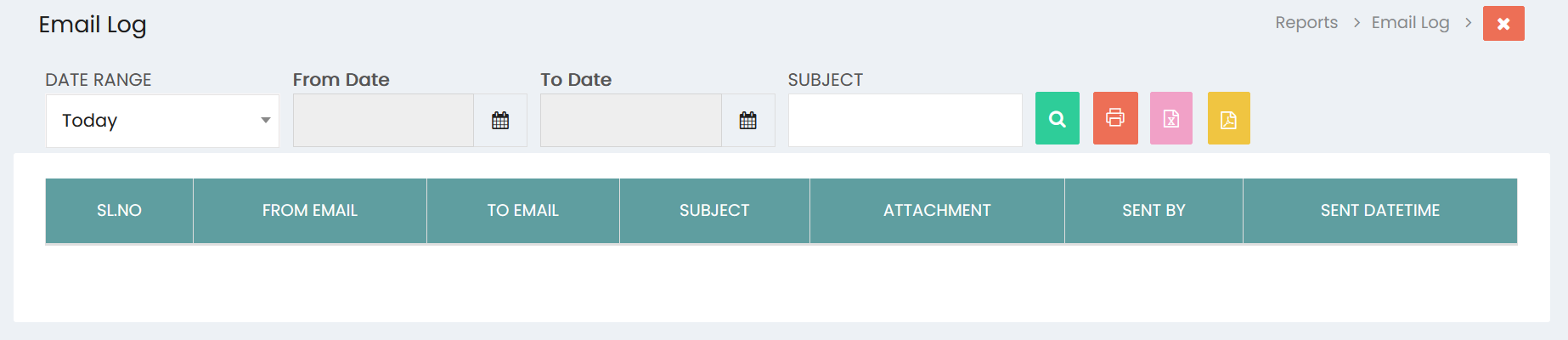
Filters
- Date Range – Select the required date range for the email log. The default option is Today.
- From Date – Select the starting date for the email log.
- To Date – Select the ending date for the email log.
- Subject – Enter a subject to filter the email logs based on the email subject.
Search
Click the Search button to display the email logs based on the selected filters.
Email Log Details
The report displays the following information:
- SL.NO – Serial number of the email log entry.
- FROM EMAIL – Email address from which the email was sent.
- TO EMAIL – Email address to which the email was sent.
- SUBJECT – Subject of the email.
- ATTACHMENT – Attachment included with the email, if any.
- SENT BY – User who sent the email.
- SENT DATETIME – Date and time when the email was sent.
Print and Export
- Click the Print button to print the displayed Email Logs report.
- Click the Excel button to export the report to Excel.
- Click the PDF button to export the report as a PDF.