


Overview
The Manufacturing Work Orders module is used to create and manage work orders for manufacturing finished products. It allows users to define the finished product, warehouses, BOM, quantity to manufacture, co-products or scrap, additional expenses, and manufacturing costs.
Manufacturing Work Order List
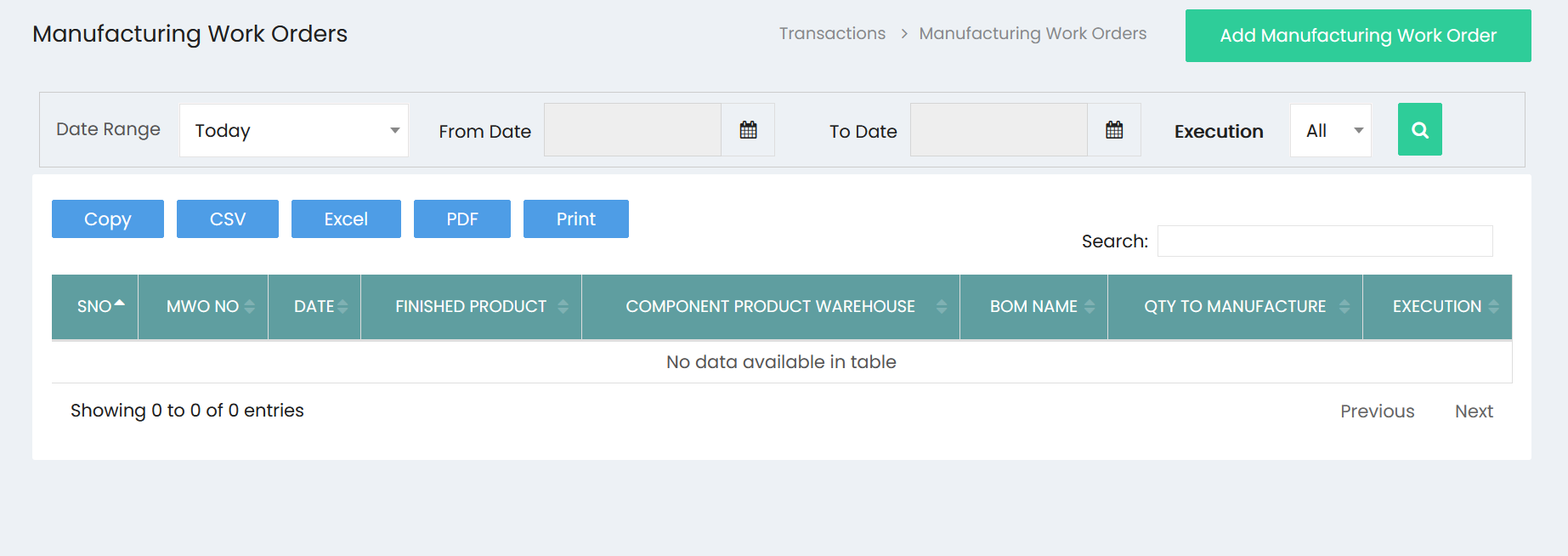
The Manufacturing Work Orders list displays all created work orders.
The list includes the following information:
- S.No – Serial number of the work order.
- MWO No – Manufacturing Work Order number.
- Date – Date of the work order.
- Finished Product – Product being manufactured.
- Component Product Warehouse – Warehouse from which components are issued.
- BOM Name – Bill of Materials used for manufacturing.
- Qty to Manufacture – Quantity planned for production.
- Execution – Execution status of the work order.
Date and Execution Filters
The work order list can be filtered using:
- Date Range – Select a predefined date range such as Today.
- From Date – Specify the starting date.
- To Date – Specify the ending date.
- Execution – Filter work orders based on their execution status.
- Search – Search for a specific work order or product.
The list also provides options to Copy, CSV, Excel, PDF, and Print the displayed records.
Add Manufacturing Work Order
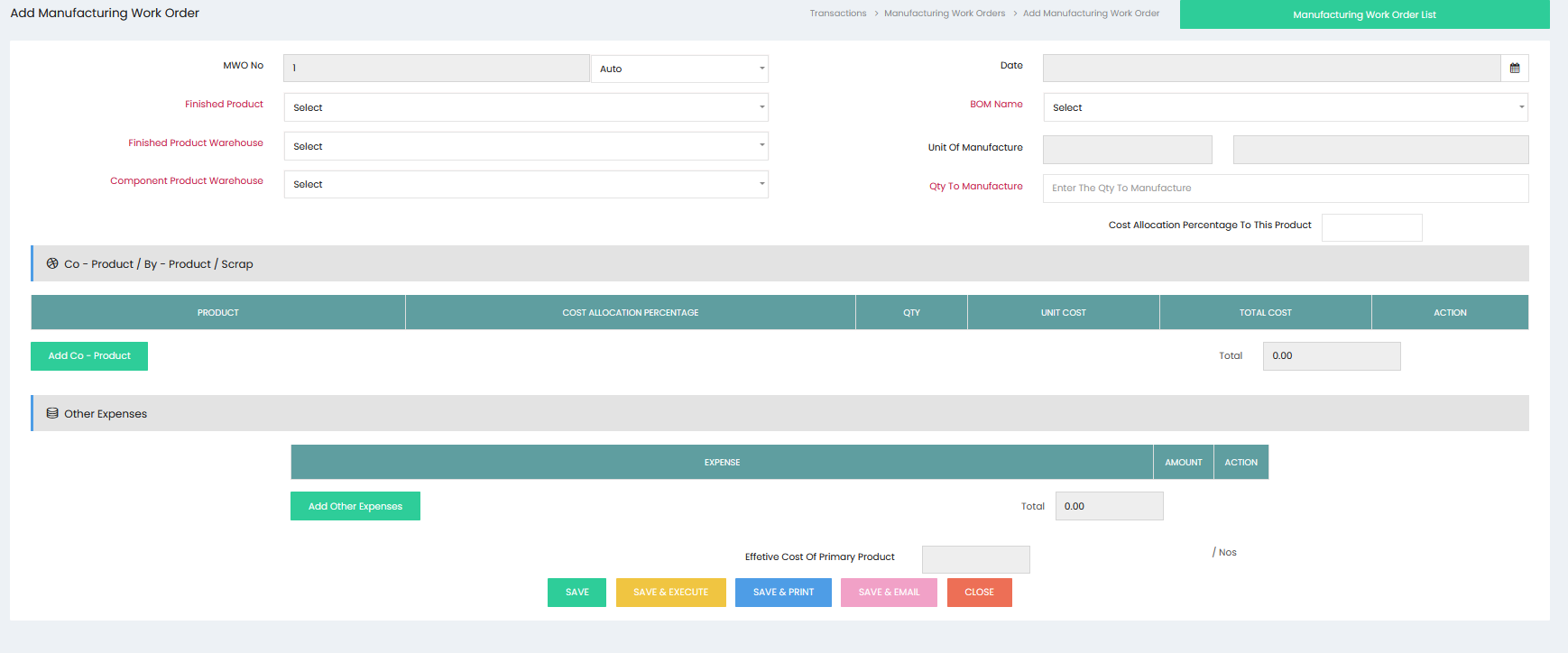
Click Add Manufacturing Work Order to create a new manufacturing work order.
Work Order Details
Enter the required manufacturing information:
- MWO No – Enter the manufacturing work order number or use the automatic numbering option.
- Date – Select the manufacturing work order date.
- Finished Product – Select the product to be manufactured.
- Finished Product Warehouse – Select the warehouse where the finished product will be stored.
- Component Product Warehouse – Select the warehouse from which component products will be consumed.
- BOM Name – Select the applicable Bill of Materials.
- Unit of Manufacture – Specify the unit used for manufacturing.
- Qty to Manufacture – Enter the quantity of the finished product to be manufactured.
- Cost Allocation Percentage to This Product – Enter the applicable cost allocation percentage for the finished product.
Co-Product / By-Product / Scrap
The Co-Product / By-Product / Scrap section is used to record additional products or scrap generated during the manufacturing process.
Click Add Co - Product to add an item.
The details include:
- Product – Select the co-product, by-product, or scrap item.
- Cost Allocation Percentage – Specify the percentage of manufacturing cost allocated to the item.
- Qty – Enter the quantity produced or generated.
- Unit Cost – Displays or records the cost per unit.
- Total Cost – Displays the total cost associated with the item.
- Action – Manage the added entry.
The total cost of the co-products, by-products, or scrap is displayed in the section.
Other Expenses
The Other Expenses section is used to record additional expenses related to the manufacturing process.
Click Add Other Expenses to add an expense.
The details include:
- Expense – Select the applicable expense.
- Amount – Enter the expense amount.
- Action – Manage the added expense.
The total amount of other expenses is displayed in the section.
Effective Cost of Primary Product
The Effective Cost of Primary Product represents the effective manufacturing cost allocated to the primary finished product after considering the applicable production costs and expenses.
The effective cost is displayed along with the applicable unit reference.
Save Manufacturing Work Order
After entering the required manufacturing details, use the available actions:
- Save – Save the Manufacturing Work Order.
- Save & Execute – Save the work order and execute the manufacturing transaction.
- Save & Print – Save the work order and generate a printable version.
- Save & Email – Save the work order and prepare it for email.
- Close – Close the Manufacturing Work Order screen.
Manufacturing Work Order Execution
When the Manufacturing Work Order is executed, the manufacturing transaction is processed based on the selected finished product, BOM, component warehouse, quantity to manufacture, co-products or by-products, scrap, and additional expenses.
The work order records the manufacturing details and associated costs for inventory and production tracking.