


The Delivery Challans report provides a summary of delivery challans recorded in the system. It allows users to view delivery challans based on the selected date range, customer, and warehouse.
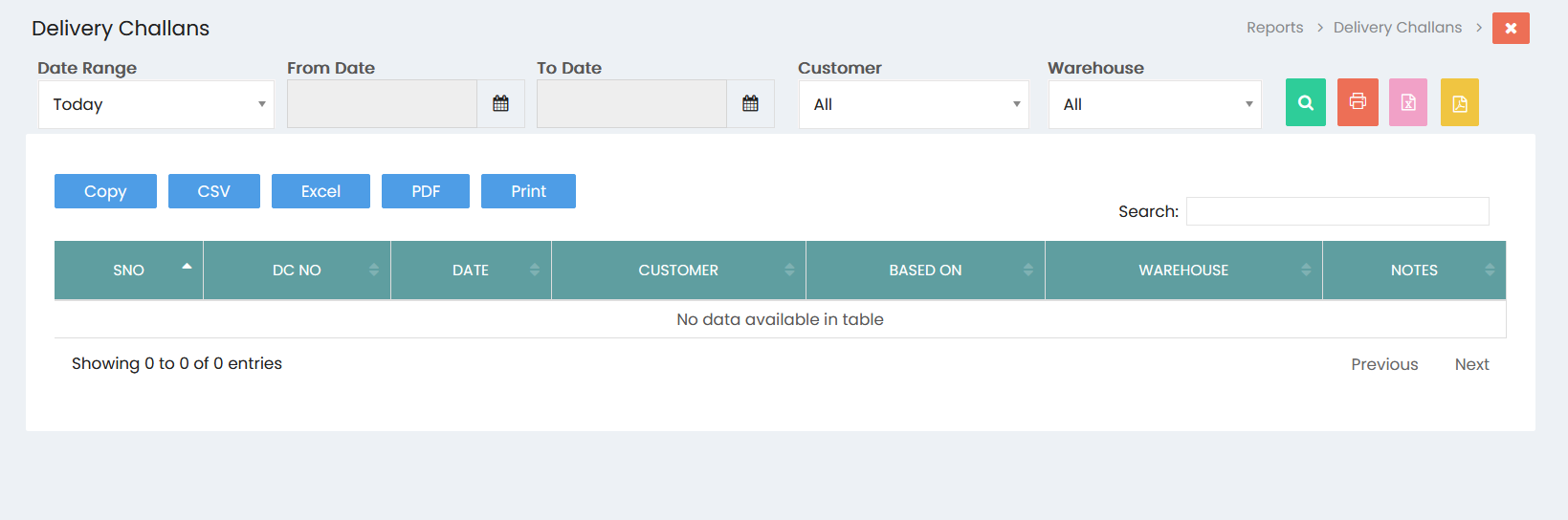
Filters
- Date Range: Select the required date range, such as Today, to filter delivery challan records.
- From Date: Select the starting date for the report.
- To Date: Select the ending date for the report.
- Customer: Select a specific customer or choose All to view delivery challans for all customers.
- Warehouse: Select a specific warehouse or choose All to view delivery challans for all warehouses.
- Click the Search button to display the delivery challan records based on the selected filters.
Delivery Challans List
The delivery challan records are displayed in a table with the following details:
- SNO: Displays the serial number of the delivery challan.
- DC NO: Displays the delivery challan number.
- Date: Displays the delivery challan date.
- Customer: Displays the customer associated with the delivery challan.
- Based On: Displays the transaction or document on which the delivery challan is based.
- Warehouse: Displays the warehouse associated with the delivery challan.
- Notes: Displays any notes or additional information recorded for the delivery challan.
Export and Print Options
The report provides the following options:
- Copy: Copies the displayed delivery challan data.
- CSV: Exports the delivery challan data in CSV format.
- Excel: Exports the delivery challan data in Excel format.
- PDF: Exports the delivery challan report in PDF format.
- Print: Prints the delivery challan report.
Search
Use the Search field to quickly find a specific delivery challan, customer, or related record from the displayed results.
Pagination
The pagination section displays the number of delivery challan records available and provides Previous and Next options to navigate between pages.