


The Order Wise Profit & Loss report provides a detailed financial analysis of a selected sales order. It helps users compare order value, delivery value, production expenses, GST expenses, and profit performance.
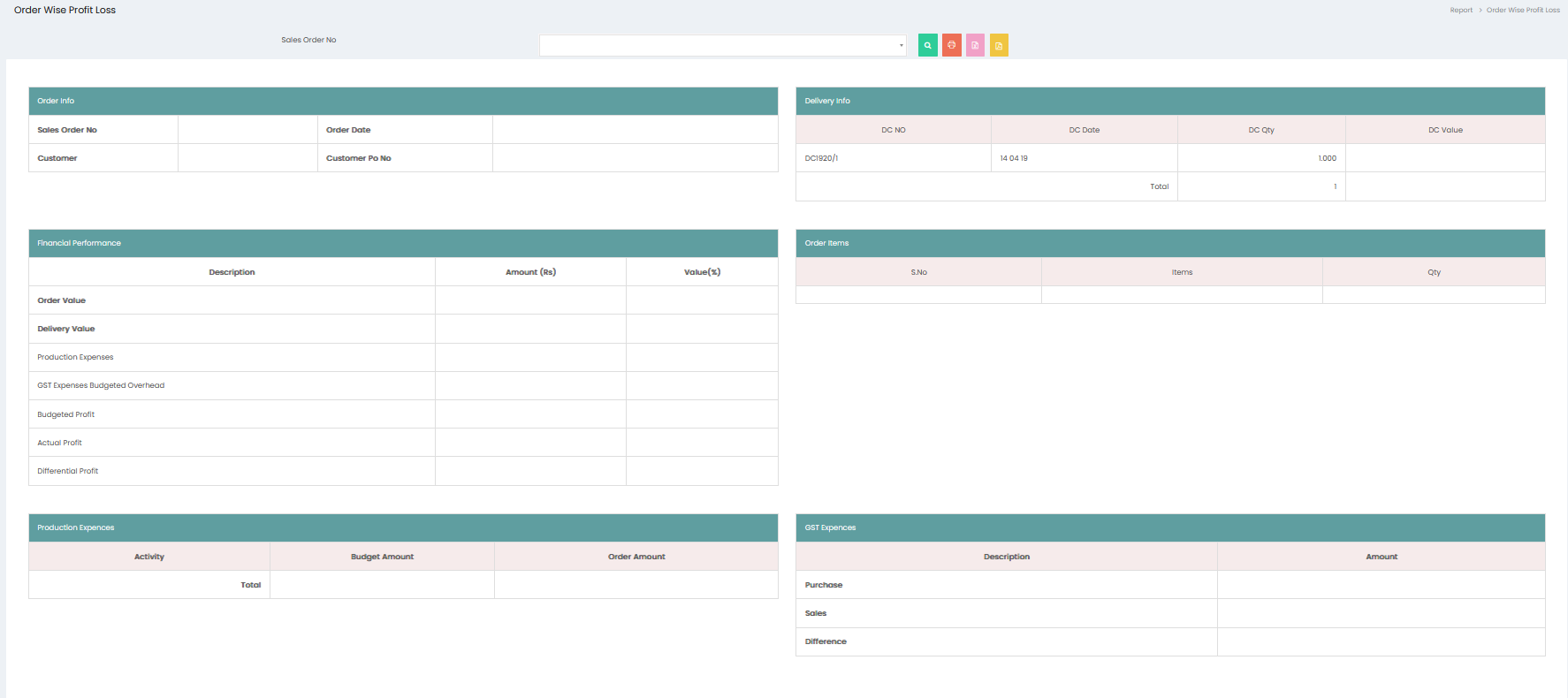
Sales Order Selection
- Sales Order No – Select the required sales order to view its profit and loss details.
- Click the Search button to display the report for the selected sales order.
Order Info
The Order Info section displays:
- Sales Order No – Selected sales order number.
- Order Date – Date of the sales order.
- Customer – Customer associated with the sales order.
- Customer PO No – Purchase order number provided by the customer.
Delivery Info
The Delivery Info section displays:
- DC No – Delivery Challan number.
- DC Date – Date of the Delivery Challan.
- DC Qty – Quantity delivered.
- DC Value – Value of the delivered quantity.
- Total – Total delivered quantity.
Financial Performance
The Financial Performance section provides a comparison of the order's financial values:
- Order Value – Total value of the sales order.
- Delivery Value – Total value of goods delivered.
- Production Expenses – Expenses incurred for production.
- GST Expenses Budgeted Overhead – Budgeted GST and overhead expenses.
- Budgeted Profit – Expected profit based on the budget.
- Actual Profit – Profit calculated based on actual values.
- Differential Profit – Difference between the budgeted profit and actual profit.
The financial values are displayed under Amount (Rs) and Value (%).
Order Items
The Order Items section displays:
- S.No – Serial number of the item.
- Items – Item included in the sales order.
- Qty – Quantity of the item ordered.
Production Expenses
The Production Expenses section displays:
- Activity – Production activity associated with the order.
- Budget Amount – Budgeted amount for the activity.
- Order Amount – Actual amount associated with the order.
- Total – Total production expense amounts.
GST Expenses
The GST Expenses section displays:
- Purchase – GST amount associated with purchases.
- Sales – GST amount associated with sales.
- Difference – Difference between purchase and sales GST amounts.
Print and Export
- Click the Print button to print the displayed Order Wise Profit & Loss report.
- Click the Excel button to export the report to Excel.
- Click the PDF button to export the report as a PDF.