


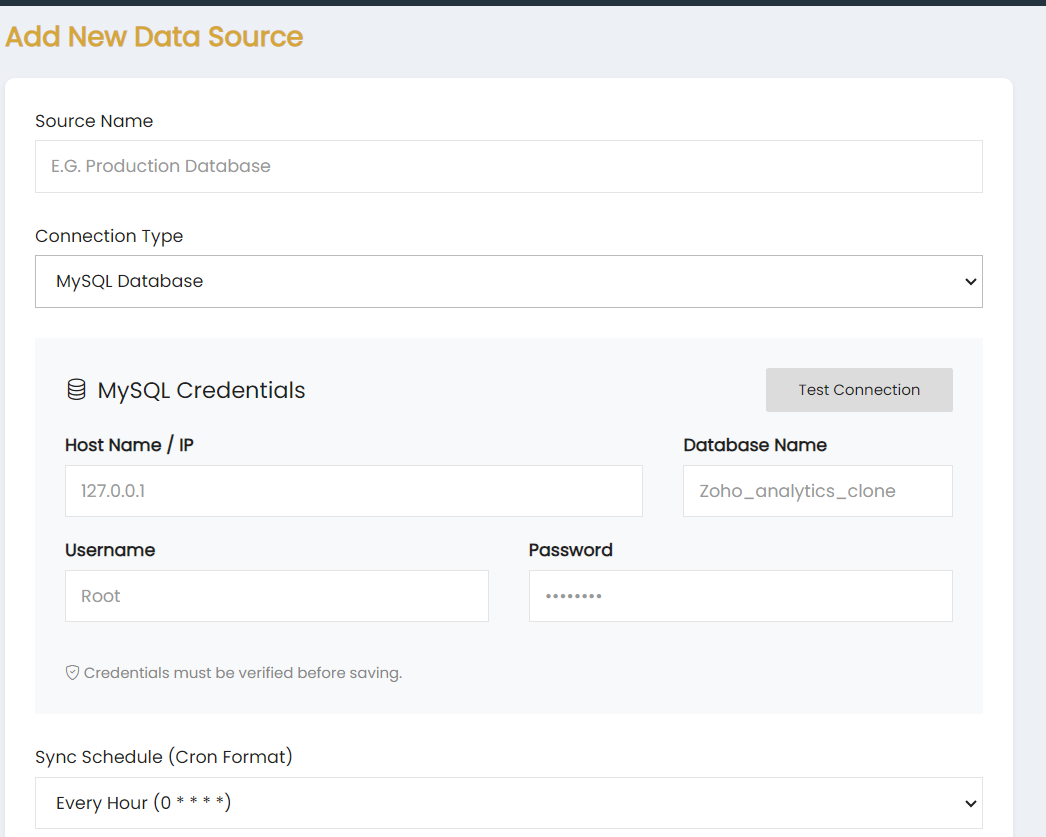
The Add New Data Source page allows users to add a MySQL database as a data source in Skynyx BI.
Source Name
Enter the name of the data source in the Source Name field.
Connection Type
Select MySQL Database from the Connection Type dropdown.
MySQL Credentials
Enter the required MySQL database connection details:
- Host Name / IP – Enter the host name or IP address of the MySQL database.
- Database Name – Enter the name of the database.
- Username – Enter the MySQL username.
- Password – Enter the MySQL password.
The Test Connection button is available to verify the database connection. Credentials must be verified before saving the data source.
Sync Schedule
Select the required synchronization schedule from the Sync Schedule (Cron Format) dropdown. The available selection shown is Every Hour (0 * * * *).