


The Data Sources section in Skynyx BI displays the data sources connected to the system and provides information about their current status and synchronization details.
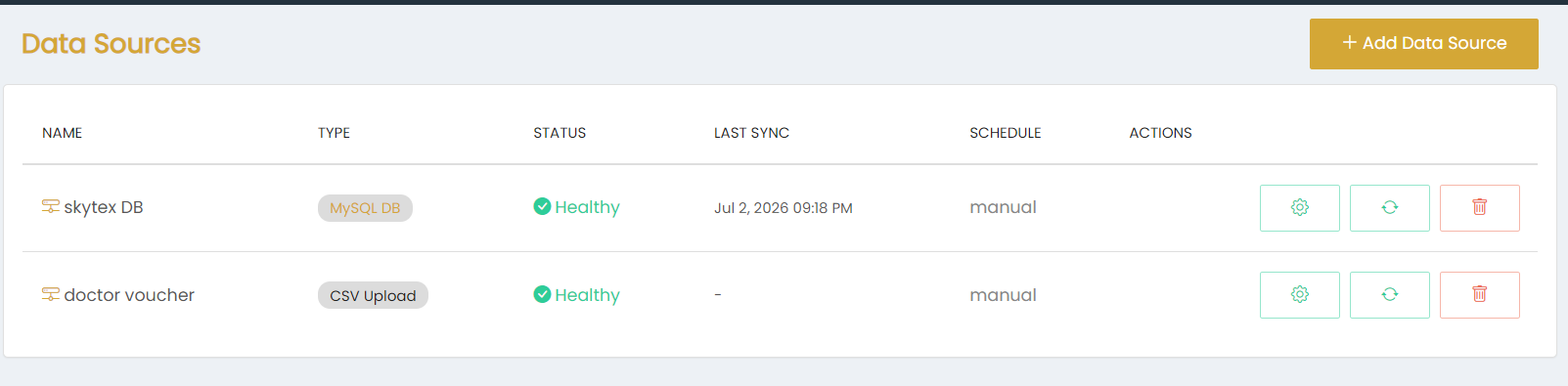
The Data Sources page includes the following information:
- Name – Displays the name of the configured data source.
- Type – Displays the type of data source, such as MySQL DB or CSV Upload.
- Status – Displays the current status of the data source. A Healthy status indicates that the data source is available.
- Last Sync – Displays the date and time of the most recent synchronization. A dash (-) is displayed when no synchronization time is available.
- Schedule – Displays the synchronization schedule, such as manual.
- Actions – Provides options to manage, synchronize, or delete the data source.
The + Add Data Source button is available at the top of the page for adding a new data source.
Each configured data source has action options represented by icons for managing the source, triggering synchronization, and deleting the data source.