


The Deal Reports section provides a detailed view of sales deals based on selected dates, accounts, deal types, stages, sources, teams, owners, and deal names. It helps users monitor deal activity, analyze sales opportunities, and review deal performance.
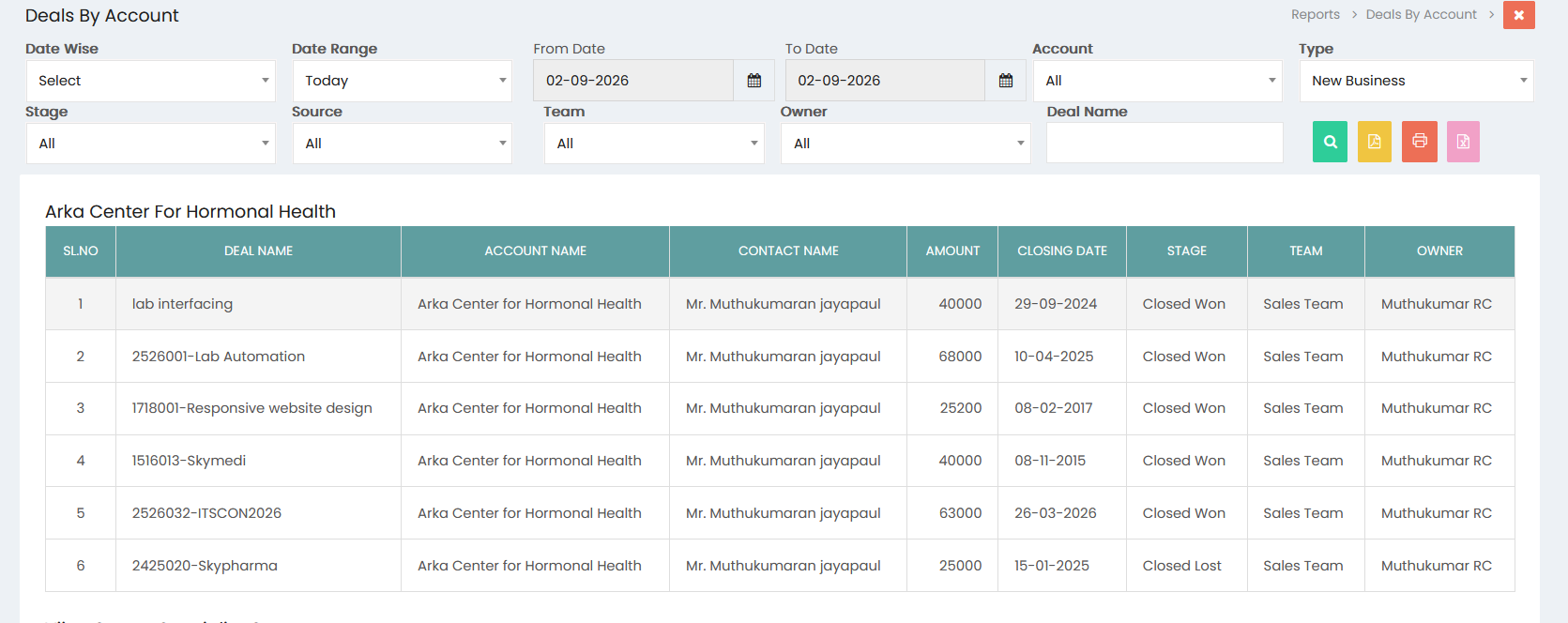
Report Filters
The Deal Reports screen provides the following filters:
- Date Wise – Select the required date-wise reporting option.
- Date Range – Select a predefined date range such as Today.
- From Date – Select the starting date for the report.
- To Date – Select the ending date for the report.
- Account – Select an account to view deals associated with a specific customer.
- Type – Select the type of deal, such as New Business.
- Stage – Select the deal stage to filter deals based on their current status.
- Source – Select the source from which the deal was generated.
- Team – Select the sales team associated with the deal.
- Owner – Select the user responsible for managing the deal.
- Deal Name – Enter a specific deal name to search for a particular opportunity.
Selecting All in a filter displays deals across all available values for that field.
Viewing Deal Reports
After selecting the required filters, click the Search button to generate the report. The report displays deals according to the selected criteria.
The report can group or display deal information based on the selected account and reporting criteria.
Deal Information
The Deal Reports table provides the following information:
- Sl.No – Displays the sequential number of the deal.
- Deal Name – Displays the name of the sales opportunity.
- Account Name – Displays the customer account associated with the deal.
- Contact Name – Displays the contact associated with the deal.
- Amount – Displays the value of the deal.
- Closing Date – Displays the closing date of the deal.
- Stage – Displays the current or final stage of the deal.
- Team – Displays the sales team responsible for the deal.
- Owner – Displays the user responsible for managing the deal.
Deal Stage Analysis
The report allows users to review deals according to their stages, including successful and unsuccessful outcomes such as Closed Won and Closed Lost. This helps users evaluate the progress and outcome of sales opportunities.
Deal Performance Monitoring
Deal Reports provide visibility into deal values, closing dates, customer accounts, contacts, sales teams, and deal owners. This information helps sales teams monitor opportunities and management evaluate sales performance.
Exporting Deal Reports
The report provides options to export and print the displayed deal information. Users can generate reports in available formats such as PDF and Excel, or use the Print option to obtain a printable copy.
Deal Report Management
The Deal Reports section helps users analyze sales opportunities, review deal values, track closing dates, monitor deal stages, and evaluate sales activity by account, team, owner, and source.