


The Activity Reports section provides a centralized view of user activities performed within the system. It helps users monitor system operations and maintain a record of activities based on a selected date range and user.
Date Range
The Date Range section allows users to define the period for which activity information should be displayed.
- Date Range – Select a predefined period such as Today.
- From Date – Select the starting date for the report.
- To Date – Select the ending date for the report.
User Filter
The User field allows users to filter the activity report based on a specific system user. Select All to view activities performed by all users.
Activity Log
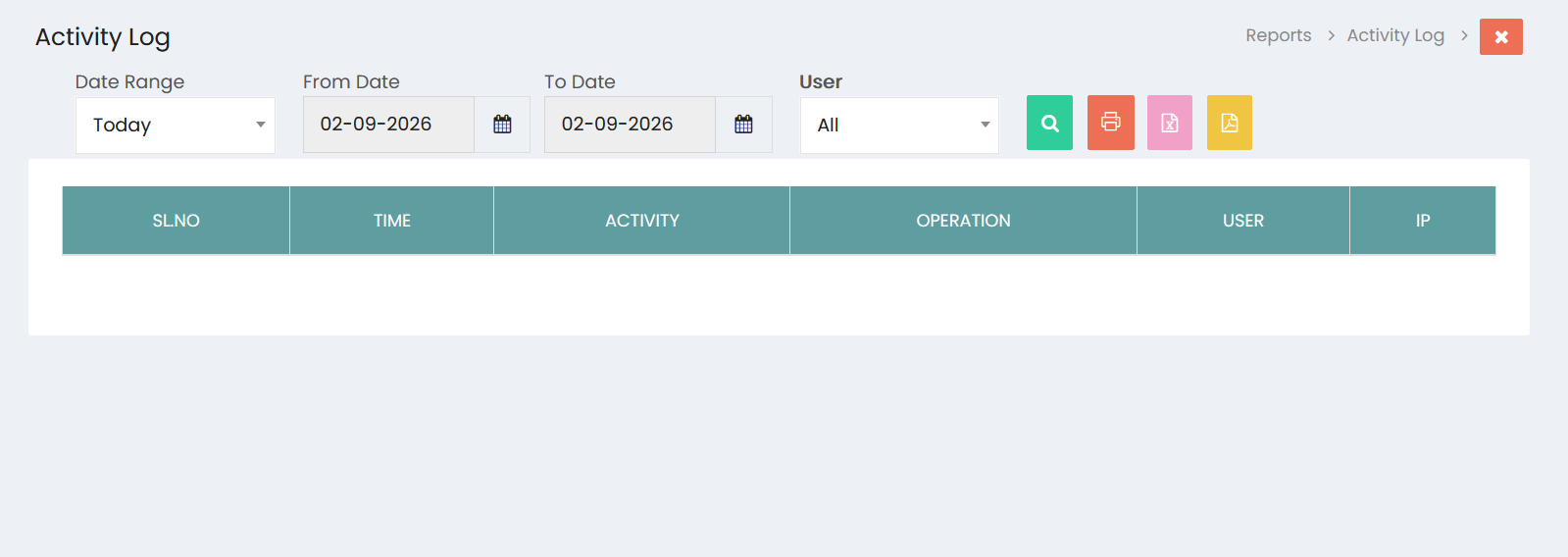
The Activity Log displays the recorded system activities with the following information:
- Sl.No – Displays the sequential number of the activity.
- Time – Displays the time at which the activity occurred.
- Activity – Displays the activity performed in the system.
- Operation – Displays the type of operation performed.
- User – Displays the user who performed the activity.
- IP – Displays the IP address from which the activity was performed.
Viewing Activity Reports
After selecting the required date range and user, click the Search button to display the corresponding activity records. The report provides a chronological view of activities performed within the selected period.
Exporting Activity Reports
The Activity Reports screen provides options to export and print the displayed activity information. Users can generate reports in available file formats or use the Print option to obtain a printable copy.
Activity Monitoring
The Activity Reports section helps administrators and authorized users monitor system operations, identify user activities, and maintain a clear record of actions performed within the system.