


The Sales Teams & Users section is used to create and manage sales teams and assign users to each team. It helps organize sales activities by grouping users under a designated team and team manager.
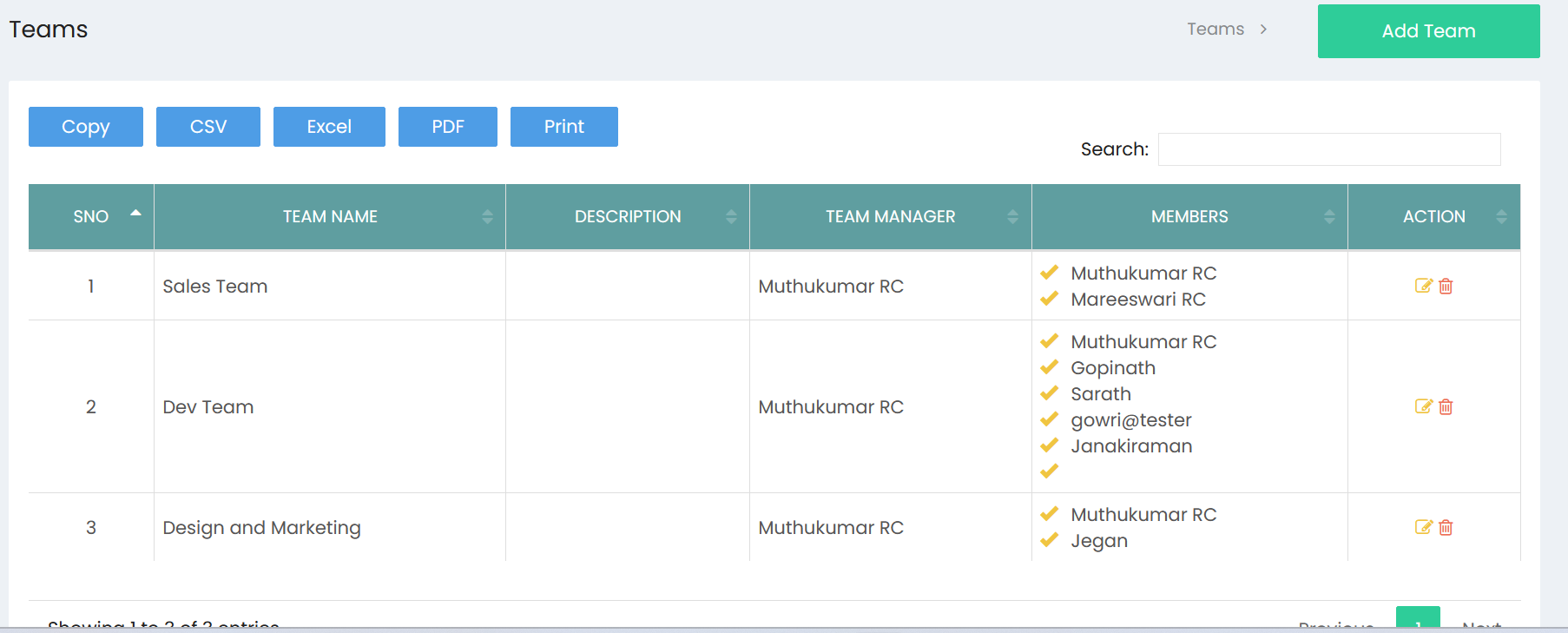
Sales Teams List
The Sales Teams list displays the teams configured in the system.
The list includes:
- S.No – Serial number of the team.
- Team Name – Name of the sales team.
- Description – Description of the team.
- Team Manager – User responsible for managing the team.
- Members – Users assigned to the team.
- Action – Options to edit or delete the team.
Use the Search field to quickly locate a specific team.
The Copy, CSV, Excel, PDF, and Print options can be used to export or print the displayed team information.
Creating a Sales Team
Select Add Team to create a new sales team.
Enter the required team details, including:
- Team Name – Enter the name of the sales team.
- Description – Enter a description of the team's purpose or responsibilities.
- Team Manager – Select the user who will manage the team.
- Members – Select the users who should be assigned to the team.
After entering the details, save the team to add it to the Sales Teams list.
Managing Sales Teams
Existing teams can be maintained using the Action options available for each team.
- Edit – Modify the team name, description, manager, or members.
- Delete – Remove the team when it is no longer required.
The Members section provides a clear view of the users currently assigned to each sales team, while the Team Manager identifies the person responsible for the team.